
Oracle Multicloud Journey – Part 2: Replacing Active Data Guard for Reporting with Oracle GoldenGate@Azure
Continuing the journey
In the first post of this series, I explained why the migration strategy relied on Oracle Zero Downtime Migration (ZDM) together with Oracle GoldenGate to move the production database from an on-premises Oracle RAC environment to Oracle Autonomous Database Serverless@Azure. You can check it here: Oracle Multicloud Journey – Part 1: The Architecture Decision
At that point, the migration path looked clear.
Or at least we thought it did.
Once we started reviewing the existing production environment in more detail, another challenge became evident. One that, in my opinion, ended up being much more interesting than the migration itself.
The existing reporting architecture
The on-premises environment already included an Oracle Active Data Guard database.
Although its primary purpose was Disaster Recovery, the client was also using the standby database as their reporting environment.
This is a very common architecture.
Since Active Data Guard continuously applies redo in real time while allowing the standby database to remain open read-only, reporting queries can be executed without impacting the production workload. The reporting database always remains synchronized with production, with only a minimal replication lag.
For the business, this architecture worked perfectly.
Users connected their reporting tools to the standby database while transactional workloads remained isolated on the primary database.
The cloud architecture changed everything
One important point is that the target cloud architecture had already been defined before I joined the project, as you remind, they mentioned to me that they already chose Autonomous DB.
The client had chosen Oracle Autonomous Database Serverless@Azure as the destination platform, and that decision had already been approved.
However, the original architecture focused on the production database migration and did not address how the reporting environment would be implemented after the cutover.
Once we started discussing this requirement, Oracle representatives also became involved to evaluate the available alternatives.
Naturally, the first option considered was Active Data Guard.
Unfortunately, Active Data Guard is not available for Autonomous Database Serverless.
The next alternative discussed was Refreshable Clone.
Although technically interesting for several use cases, it also wasn’t a viable solution here. Besides not being available for this deployment model at the time, scheduled refreshes would never satisfy the business requirement.
The reporting environment needed to remain almost continuously synchronized with production, with a maximum acceptable lag of approximately five minutes.
A periodically refreshed copy simply could not meet that expectation.
At this point, we needed a different approach.
Looking beyond traditional database replication
Fortunately, the client already owned Oracle GoldenGate licenses for their existing environment.
That completely changed the conversation.
Around the same period (actually few weeks before), Oracle had released Oracle GoldenGate Service for Azure, a fully managed GoldenGate service running directly inside Oracle Database@Azure environments.
Compared to deploying and maintaining GoldenGate manually, the managed service significantly reduces operational effort.
There is no infrastructure to build, no operating system to maintain, and no GoldenGate software lifecycle to manage (well, you still can update or upgrade by using OCI Console – but is fully automated!)
Provisioning is straightforward, the service is fully managed by Oracle, and it is available directly alongside Autonomous Database deployments in Azure.
More importantly, it provides continuous real-time replication, exactly what the business required.
After several design discussions, I proposed using Oracle GoldenGate Service@Azure as the long-term synchronization mechanism between the production Autonomous Database and a dedicated reporting Autonomous Database.
The proposal satisfied all of the project’s technical requirements:
- near real-time synchronization.
- replication latency well below the business requirement.
- managed infrastructure.
- minimal operational overhead.
- seamless integration with Autonomous Database.
The resulting architecture
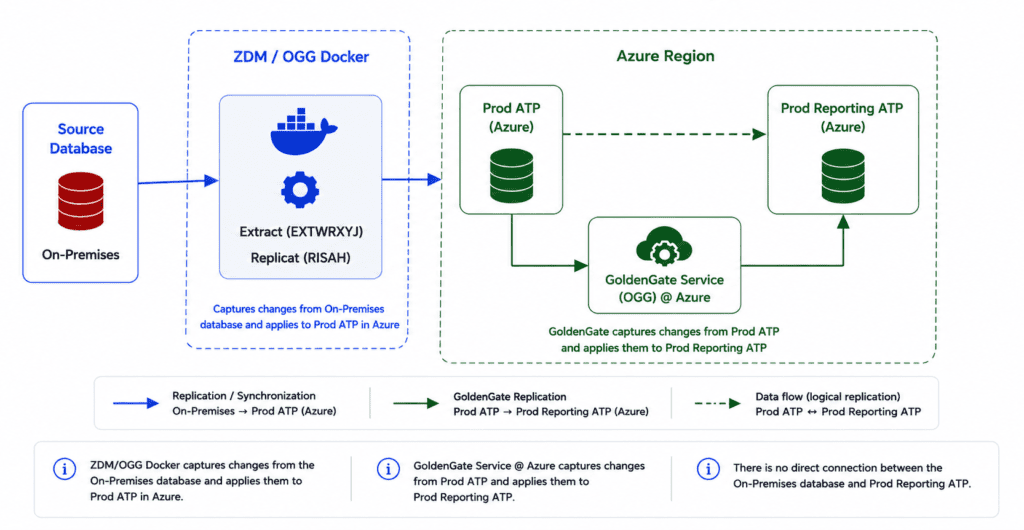
The final solution initially consisted of two completely independent GoldenGate deployments working together.
The first deployment existed exclusively to support the migration itself.
It captured changes from the on-premises production database and applied them to the new Autonomous Database during the ZDM online migration process. Once production was cut over to Azure, this deployment had fulfilled its purpose and could be safely decommissioned.
The second deployment had a completely different objective.
Instead of supporting the migration, it became the permanent synchronization mechanism between the production Autonomous Database and another Autonomous acting as a reporting database.
This resulted in a cascaded replication architecture.
The first GoldenGate deployment synchronized the on-premises database with the new production environment during the migration window.
The second GoldenGate deployment continuously captured changes from the production Autonomous Database and replicated them to the reporting Autonomous Database, which became the long-term reporting platform.
Below we can see how the OGG cascaded configuration was designed:
One important observation is that, unlike Active Data Guard, the reporting Autonomous Database remains fully read/write.
For that reason, access control becomes extremely important.
Reporting users, including BI platforms such as Tableau (their case), should connect using accounts that have only read privileges. From an application perspective, the environment behaves exactly like the previous reporting database, while administrative controls ensure that no reporting workload can modify production data.
What’s next?
At this point, the architecture solved two independent problems.
The migration path was defined.
The reporting architecture had been redesigned.
The next challenge was to review the CPAT assessment and determine whether there were any compatibility issues or restrictions that could affect the migration.
As I mentioned before, I wasn’t involved in the discussions when the target cloud architecture was originally defined, so this was my first opportunity to validate that everything would work as expected.
I’ll cover that in the next post of this series.
Hope it helps.
Peace,
Vinicius
Leave a comment