
Oracle Multicloud Journey – Part 1: The Architecture Decision
Introduction
Over the last few months, I had the opportunity to work on a project where a customer was planning to migrate their on-premises Oracle database to Oracle Database@Azure.
As you probably know, things in IT don’t always go exactly as planned. So, here’s how this journey started.
Last year, during Oracle AI World 2025, I was asked to prepare a presentation about migration strategies for moving an on-premises Oracle database to Exadata Database Service@Azure. Honestly, I was excited about it.
At that point, this was the environment I was expecting:
Initial Project Overview
Source environment:
- On-Premises
- Oracle RAC 19.28 (3-node cluster)
- IBM-AIX
- Active Data Guard for DR and Reporting
Target environment:
- Exadata Database Service@Azure (2-VM DB System)
Main requirement:
- Minimal downtime
From what I had seen, the workload itself wasn’t particularly demanding. CPU utilization, IOPS, and throughput were relatively modest, which made me wonder why Exadata had been selected as the target platform in the first place.
I was in my hotel room in Las Vegas preparing the presentation. Since the requirement was minimal downtime and this was clearly a cross-platform migration (AIX to Linux), my recommendation was to use RMAN CONVERT Transportable Tablespaces together with Data Pump, leveraging Oracle’s well-known M5 migration methodology.
There is already excellent documentation about the M5 approach. If you’re interested, I highly recommend the following session from Mike Dietrich and his team:
Virtual Classroom #18: Cross Platform Migrations- Transportable Tablespaces to the Extreme
The meeting went well. I walked the customer through the available migration approaches, explained the pros and cons of each one, and described why M5 was, in my opinion, the best option for their environment.
Then, about 40 minutes into the discussion, someone interrupted me with a sentence I wasn’t expecting:
“We’re actually not migrating to Exadata@Azure anymore. The plan is to migrate to Autonomous Database@Azure.”
At that moment, everything changed.
Revised Project Overview
Source environment:
- On-Premises
- Oracle RAC 19.28 (3-node cluster)
- IBM-AIX
Target environment:
- Oracle Autonomous AI Database@Azure
Main requirement:
- Minimal downtime
Since I was attending Oracle AI World that week, I asked for a few days to reassess the available migration options and prepare a new recommendation.
Choosing the Migration Strategy
The following week, I presented what I believed was the best approach for this project:
Logical Online Migration
This discussion took place in November 2025. After evaluating the available options, I recommended this migration approach because it was the only practical way to achieve near-zero downtime when migrating an Oracle Database running on IBM AIX to Oracle Autonomous Database@Azure.
The overall process consisted of the following steps:
- Configure Oracle GoldenGate Extract to start capturing changes from the on-premises database.
- Perform a Data Pump export of the schemas to be migrated using a FLASHBACK_SCN to guarantee a transactionally consistent export.
- Transfer the generated Data Pump files from the source file system to an OCI Object Storage bucket.
- Import the schemas into Oracle Autonomous Database@Azure directly from the OCI Object Storage bucket.
- Validate the import logs and resolve any issues that cannot be handled automatically.
- Configure Oracle GoldenGate Replicat to apply the captured changes to the target Autonomous Database@Azure.
- Allow GoldenGate to synchronize the remaining changes until the source and target databases are fully aligned, enabling the final cutover.
I am intentionally not covering every implementation detail because each environment has its own requirements. For example, Autonomous Database requires users, roles, privileges, network configuration, and several environment-specific objects to be prepared before the migration can begin. In addition, some database objects and configurations may require manual adjustments after the Data Pump import.
As a DBA, I always look for ways to automate repetitive tasks and reduce operational complexity. That is why I recommended using Oracle Zero Downtime Migration (ZDM), which orchestrates the entire workflow, including Data Pump and Oracle GoldenGate, significantly reducing the number of manual steps while providing a repeatable and reliable migration process.
As mentioned earlier, all of these steps could be performed manually. However, Oracle Zero Downtime Migration (ZDM) automates nearly the entire migration workflow by orchestrating both Oracle Data Pump and Oracle GoldenGate.
ZDM performs a consistent Data Pump export using a FLASHBACK_SCN, transfers the dump files to the target staging location, imports the data into the target Autonomous Database, configures Oracle GoldenGate, creates and starts the replication processes, and validates each stage of the migration. By automating these tasks, ZDM significantly reduces manual effort while providing a standardized, repeatable, and reliable migration process.
A Multicloud Architecture
The architecture shown below illustrates the solution that was implemented:
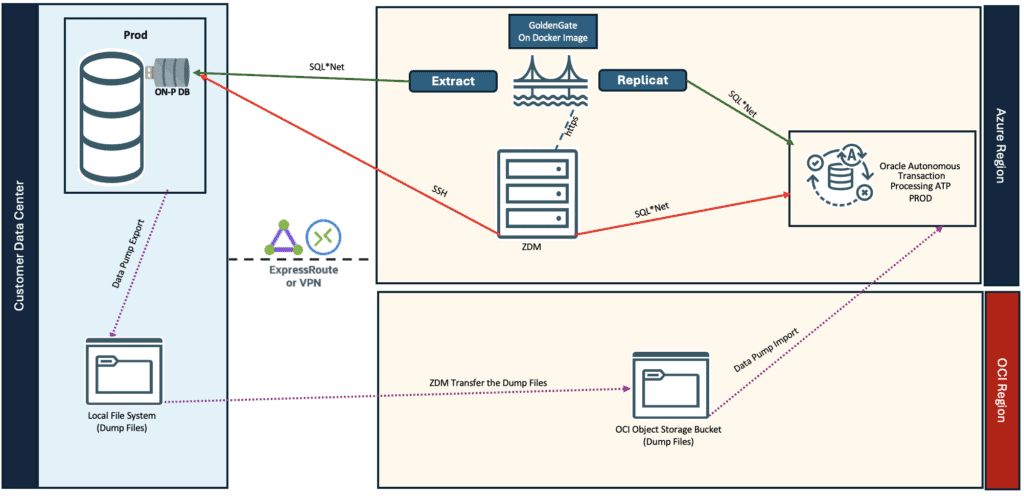
This is a changed version from the architecture exhibited in the official Oracle documentation, ZDM – Logical Online Migration to ADB-S on Oracle AI Database@Azure.
Although the database is deployed in Microsoft Azure, Oracle Autonomous Database@Azure is a multicloud solution that spans both Microsoft Azure and Oracle Cloud Infrastructure (OCI). As a result, customers also require an OCI tenancy as part of the overall architecture.
For this migration, we leveraged an OCI Object Storage bucket as the staging area for the Data Pump dump files. ZDM automatically transferred the export files from the source file system to the bucket, allowing the Autonomous Database import to be performed directly from OCI Object Storage.
This architecture illustrates how the migration workflow takes advantage of services available in both cloud providers. While the production database is deployed in Microsoft Azure, OCI Object Storage was leveraged to stage the Data Pump files as part of the migration process.
One Challenge Solved…
Defining the migration strategy solved one problem, but uncovered another one:
The source environment relied on Active Data Guard not only for disaster recovery, but also for reporting. Since Autonomous Database Serverless does not provide an equivalent architecture, simply migrating the production database was not enough. We had to redesign the entire reporting architecture.
Well, the migration approach had been established, implementing the solution involved much more than simply moving data from one database to another. Provisioning the multicloud environment, configuring the supporting infrastructure, and adapting the architecture to the capabilities of Autonomous Database@Azure introduced a new set of technical challenges.
Those topics will be covered in the next articles in this series.
Hope it helps!
Peace,
Vinicius
Leave a comment